Test version. Do not enter real data here: anything may disappear without notice.

Solvecord

Your whole home network, under control.

The rack and its free units, devices, VLANs, Wi‑Fi coverage, cameras and what they see, PoE power and cable routes. Drawn on your house and worked out.

For homelabbers and self-hosters who want their setup documented and to know what is where. Works with gear of any brand.

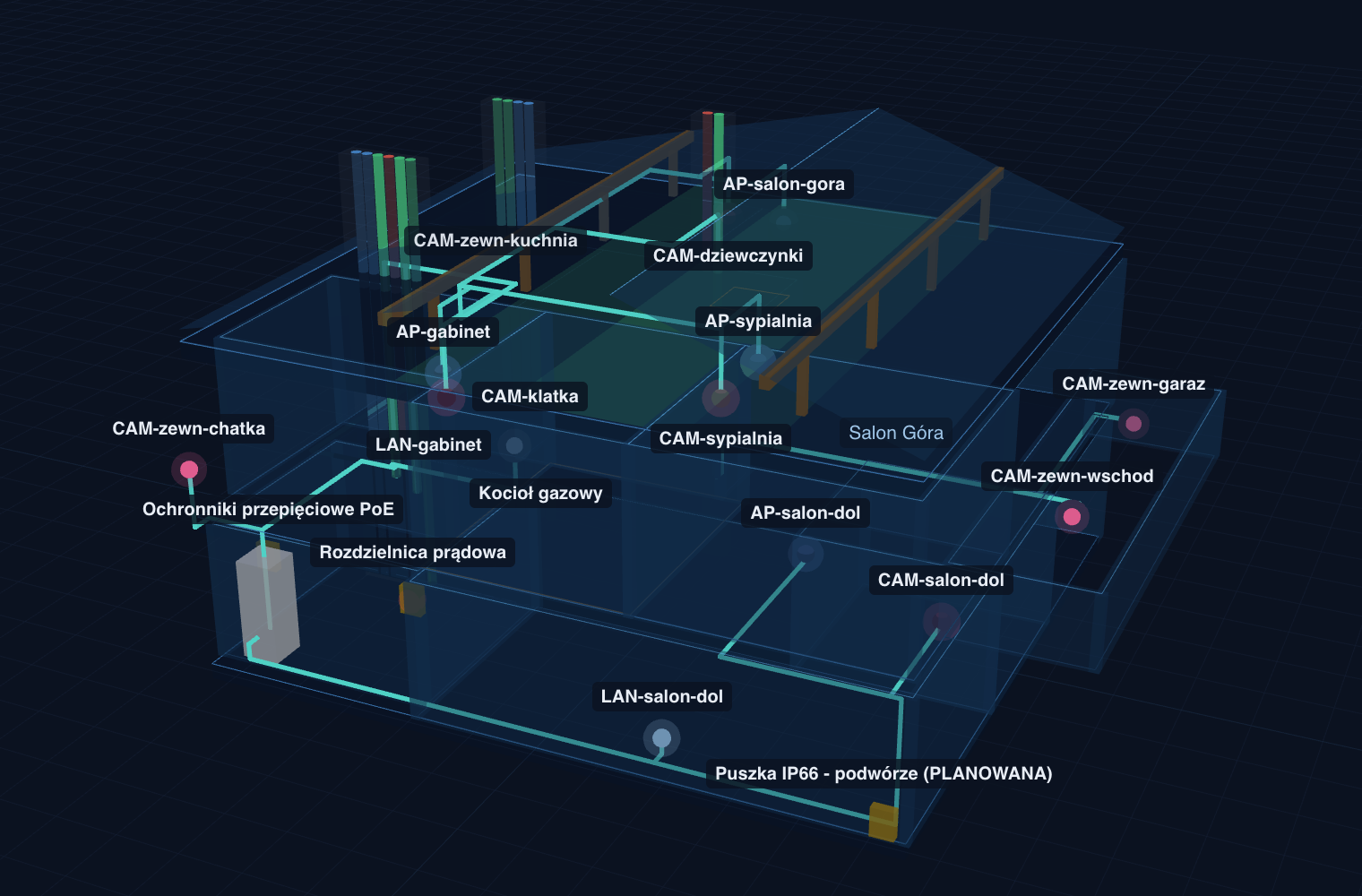
The example house in Solvecord: three floors in 3D with the rack, access points, cameras and cable routes through the floors.
The example house: 3 floors, 15 devices. The figures below are what the model works out, not brochure numbers.
13/15U
of the rack in use, 2 units free, 6 devices inside
15 devices
on the network: 5 access points, 8 cameras, 3 VLANs
52%
of the switch's PoE power, 15 of 24 ports in use
−58.5 dBm
Wi‑Fi in the weakest room, against a −67 dBm target

Your network lives in your head, a spreadsheet and a sticky note in the rack.

Which port is the camera over the garage? Will another server fit in the rack? Can the switch power one more access point? Where does the Wi‑Fi not reach? Every change drifts the notes further from what is actually on the walls.

How much room is left in the rack?
13 of 15U in use, 2 units free. 6 devices inside, each at its own height.
Can the switch power one more camera?
13 powered devices take 52% of its power, 15 of 24 ports in use. There is headroom.
Does the Wi‑Fi reach every room?
Yes: the weakest room gets −58.5 dBm with 5 access points. The target is −67 dBm.

The answers come from the example house in the app: 3 floors, 15 devices, 3 VLANs. Open it and check every figure.

From floor plan to finished network in three steps.

Draw the house once. After that you only add what changes.

  1. Trace your house

    Drop in a photo or PDF of the floor plan, set the scale from one wall you know, and click round each room.

  2. Add your gear

    Rack, switch, router, NAS, access points, cameras and sockets where they are or will be. We find the way for every cable.

  3. Check before you buy

    See free units, ports, PoE power, Wi‑Fi and camera coverage. Try every change on the model first, and print the documentation in one click.

Everything from one model.

Rack, network, power, Wi‑Fi, cameras and cables all come from the same plan. No second tool, no second copy of the floor plan.

The rack, unit by unit

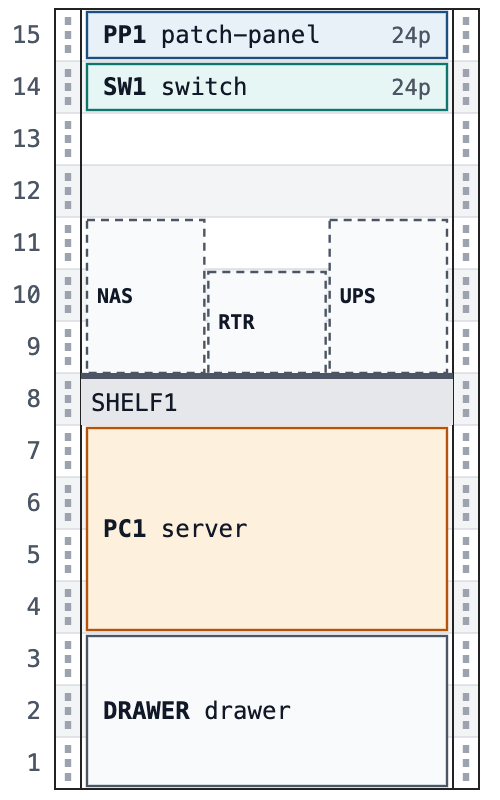
Every device at its height, shelves with what stands on them, free units counted. In the example house: 13 of 15U in use, 2 units free. Before you buy a server you know whether it fits, depth included.

Drawing of a 15U rack: patch panel and switch at the top, a shelf with the NAS, router and UPS, a 4U server and a drawer at the bottom.
The example house's rack: 13 of 15U in use.

Wi‑Fi in every room

The coverage map counts the walls and floors you drew. Switch an access point off or move it and you see which room gets weaker. It is a prediction, not a measurement, but it tells you how many access points you need.

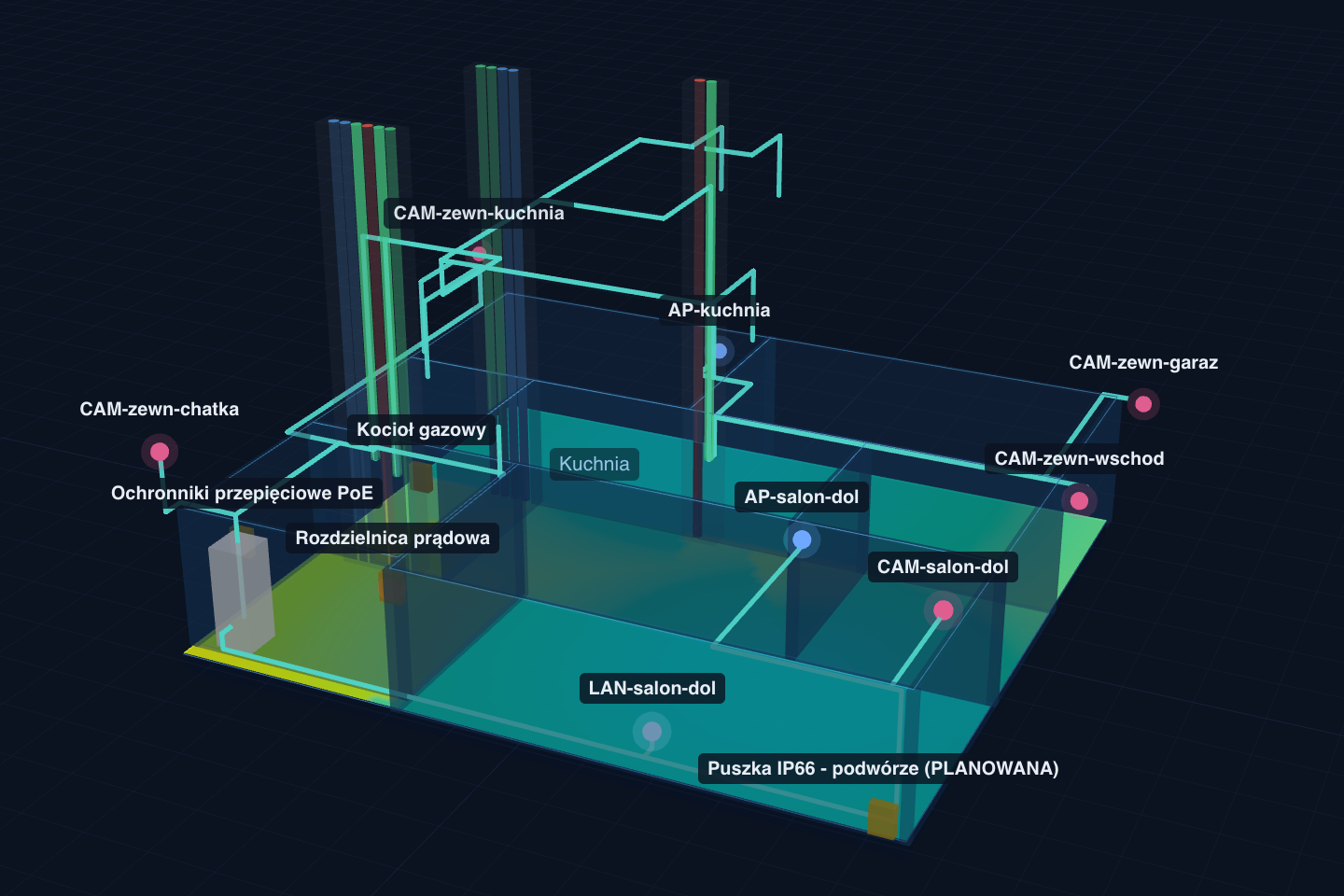
The ground floor of the example house in 3D with a Wi‑Fi coverage map on the floor: most rooms in the good-signal colour.
Ground floor of the example house. Weakest room anywhere in the plan: −58.5 dBm.

Cameras and what they see

Camera coverage is shown as detect, observe, recognise and identify zones under EN 62676-4, laid over your house. You see whether the camera over the drive will recognise a person, not just which way it points.

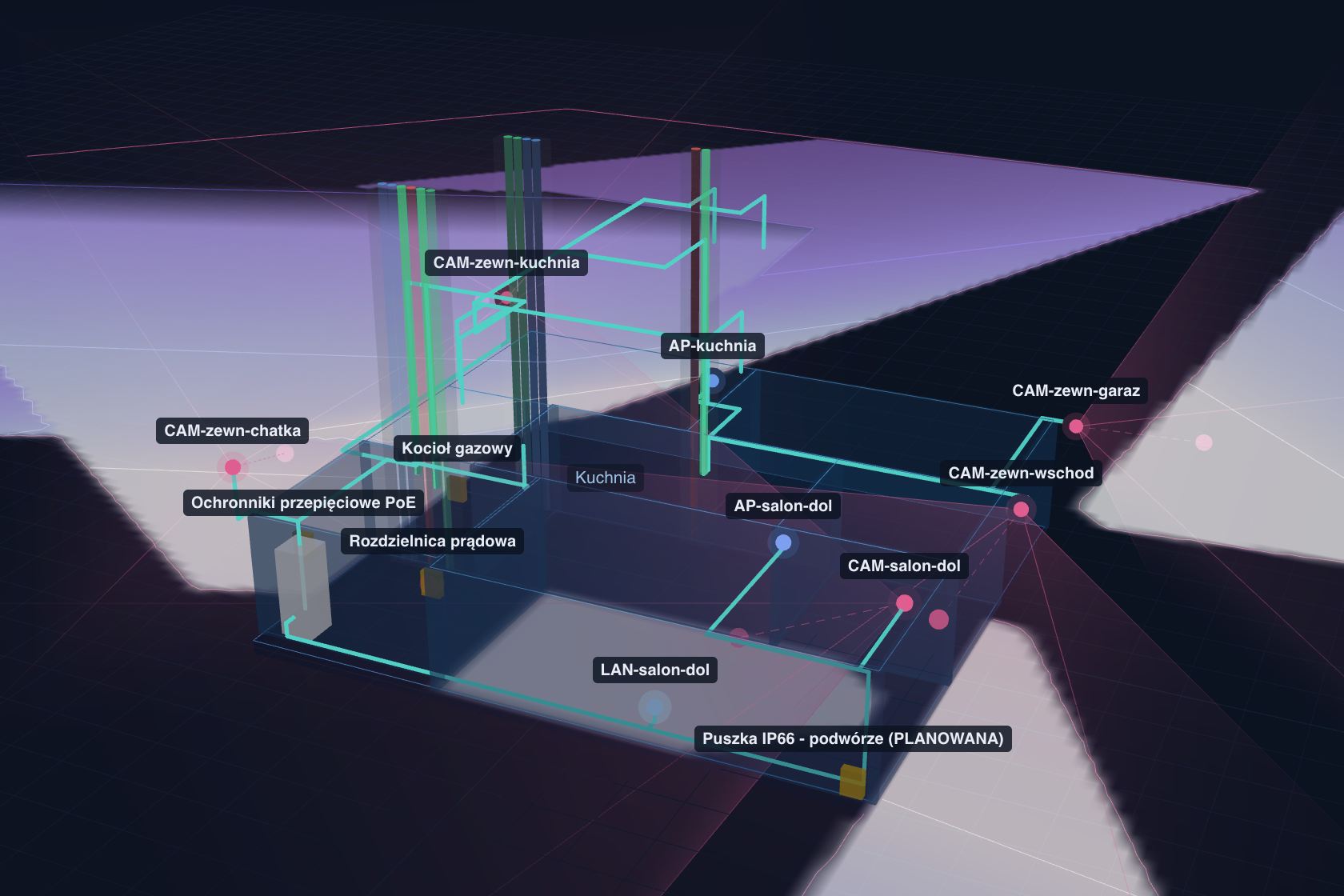
The ground floor of the example house in 3D with the fields of view of the outdoor and indoor cameras drawn on the ground.
Camera fields of view on the ground floor. In the whole house: 8 cameras.

Cables you can actually buy

Every cable is measured along the way it will actually go: through a floor, up a spare chimney flue, along a wall. The total lands on spools you can buy. Sockets, patch leads, labels and wall glands are on the list too.

Shopping list

Cat6 cable

1 × 500 m spool

340.5 m + 10% spare = 374.6 m

PLN 1,070 ex VAT, at Polish prices

Keystone jacks30
Patch leads30
Cable labels30
Firestop seals14
Exterior wall glands4
Surge arrestors4

PoE power under control

What each device draws and what the switch has left, in one number. In the example house 13 powered devices use 52% of 384 W. Add a camera and you see what is left before you buy it.

Ports, VLANs and labels

Every device has its patch-panel port, switch port, VLAN and cable label. You know what is plugged in where without a torch in the rack.

Gear of any brand

UniFi, Omada, MikroTik or a server built from parts. What counts is ports, power, size and range, not the logo on the box.

Mistakes first, shopping second

If a cable would go somewhere it must not, like a chimney that is in use, or a server will not fit the rack, you get a warning before you buy anything.

For installers

The same model that keeps your own network in order prices the job and produces the client paperwork.

The order list
Metres of cable in spools, sockets, patch leads, labels and wall glands. In the example house: 340.5 m of Cat6, which is 1 × 500 m spool.
A cable list for your crew
Label, from, to, port and cut length for every cable.
The handover pack
A plan of every floor with devices and labels, the cable list and the rack drawing. Save it as a PDF and leave it with the client.
Pro seats
Any number of client houses and a seat for everyone in the business.
See what installers get
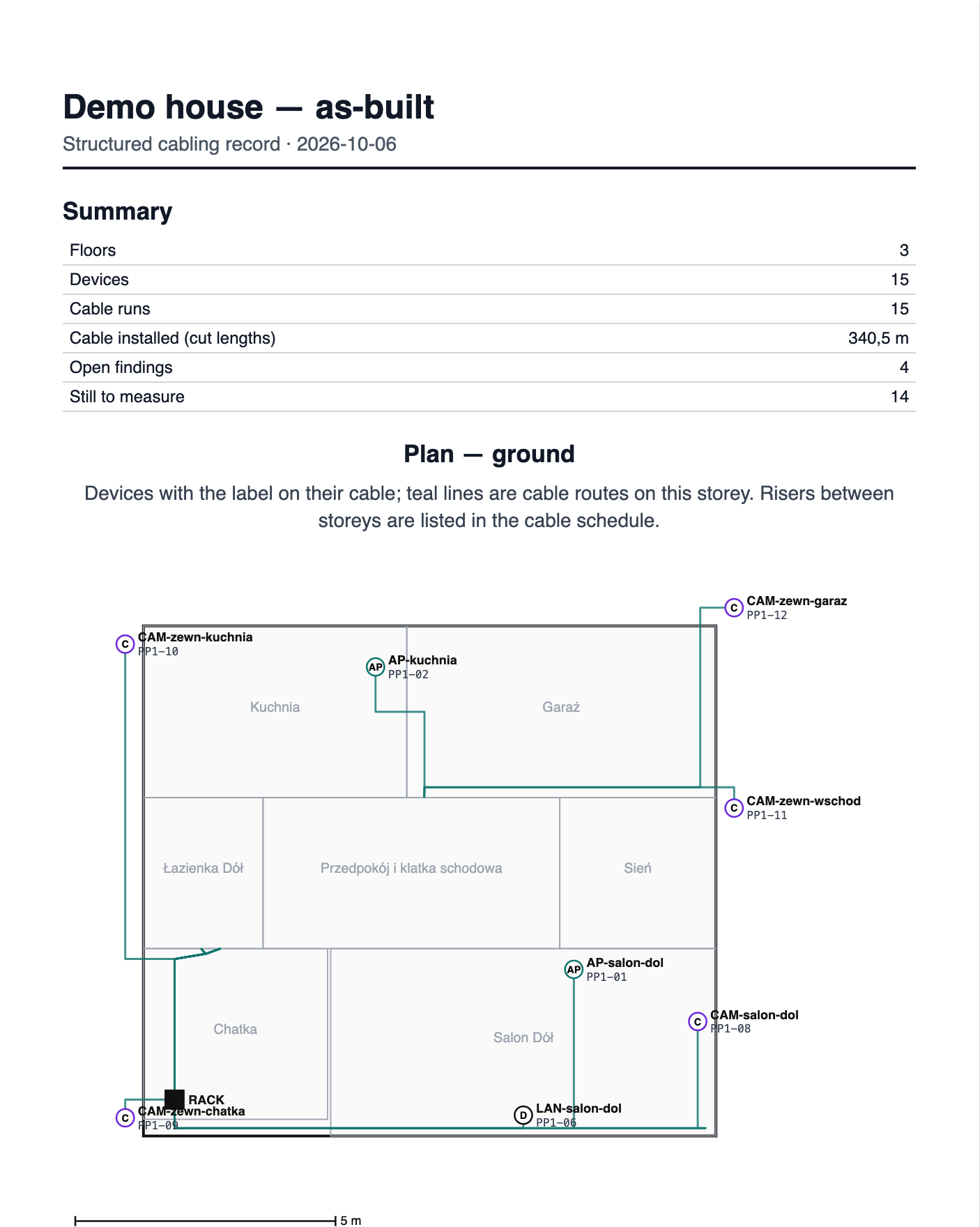
The first page of the handover record: a summary and the ground-floor plan with devices, port labels and cable routes.
First page of the example house’s handover record.

Planning is free. Your own house, you pay for once.

Every calculation works in Free, with as many houses as you like on your own computer. Home is bought once, for one house, with no subscription.

Currency

Free

€0PLN 0forever


Plan your own network and see every number. No account, no card.

  • Any number of houses on your computer
  • Rack, network, Wi‑Fi and cameras in one model
  • PoE power and free ports
  • Cable routes and the shopping list
  • One house online, with an account
  • History of the last 7 days
  • A link to the plan, valid 30 days
  • Printouts carry a small footer
Start planning

Planning houses for paying clients? See the Pro plan

Payments are handled by Paddle.com, who sell on our behalf as merchant of record, settle VAT and issue the invoice.

Questions we hear most.

Do I need an account?

No. The free plan works without an account or a card, and the project stays in your browser. An account helps when you want to work on several computers, or buy Home or Pro.

Is it worth it if the house is already built?

Yes. Draw what you already have: the rack, the switch, the access points, the cameras. You get a map of your network and a place to check the next change before you buy anything.

What exactly do I get with Home?

One house, for good: clean printouts and records, online sync, the full history of changes and up to 5 share links that never expire. You pay once, with no subscription.

Planning houses for paying clients? That is what Pro is for; it is on the page for installers.

Why not the free planner from my gear’s maker?

If every device in the house will be one brand, the maker’s free planner may be enough. It gets harder when the switch is one brand, the cameras another, and someone still has to work out how many metres of cable to order and where it can go.

How accurate is the Wi‑Fi map?

It is a good prediction, not a measurement. It tells you which rooms will be weak and how many access points you need. For a certified survey, hire a specialist with a meter.

Can I trust the power numbers?

They use each device’s catalogue data and the length of every cable. The plan helps you decide; the installation still has to follow your local electrical rules.

What happens when the plan is wrong?

If a cable would run somewhere it must not, like a chimney that is in use, we tell you and hold back the shopping list until it is fixed.

What happens to my plan?

Without an account it stays in your browser. With an account we store it so you have it on every computer. Others see it only through a link you create. We never sell or show your house to anyone.

Start with the example house.

Open it in the app: rack, network, Wi‑Fi, cameras and cables. Then draw your own.